Amtrak "Dirty 30"

In this forum you can make SUGGESTIONS for repaints and/or other downloads. If you are suggesting repaints of something, please supply a picture of it. Make it easier for the painter.

Re: Amtrak "Dirty 30"

Unread postby buzz456 » Sun Feb 07, 2016 7:00 pm

ErikGustafson wrote:Is the repaint avalible?


What re-paint is that?
Buzz
39 and holding.
"Some people find fault like there's a reward for it."- Zig Ziglar
"If you can dream it you can do it."- Walt Disney
Image
User avatar
buzz456
Site Admin
 
Posts: 21313
Joined: Sun Mar 21, 2010 8:30 am
Location: SW Florida

Re: Amtrak "Dirty 30"

Unread postby ErikGustafson » Sun Feb 07, 2016 7:17 pm

buzz456 wrote:
ErikGustafson wrote:Is the repaint avalible?

What re-paint is that?

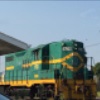
The Miami Dirty 30 repaint.
2016-02-06_00007.jpg
You do not have the required permissions to view the files attached to this post.
Dell Inspiron 15 7000 4K UHD Touch Series
6th Generation Intel Core i7 vPro 6700HQ (4.25 GHz)
NVIDIA® GeForce® GTX 980 Ti
User avatar
ErikGustafson
 
Posts: 96
Joined: Fri Jan 29, 2016 7:54 pm
Location: Kansas City, Missouri

Re: Amtrak "Dirty 30"

Unread postby tbundy1982 » Sun Feb 07, 2016 7:45 pm

Sibell wrote:I work now for 2 years with Gimp and I still explore new features of this program every day *!greengrin!*


I've been using it even longer and you just taught me a new trick. *!!thnx!!*

I follow correctly until this point:
Sibell wrote:paste the repainted one in the new layer and set the transparency how it looks good ingame and not so much shiny.


Do you create an alpha channel (transparency?) in GIMP over the repainted layer and export it straight to .dds?

I'll admit that I've always wanted to learn to do this, but I remember having troubles trying to create transparencies in the past. The reason I use DXTBmp is to correctly control the alpha channel.

Thanks for your contributions. Good luck with finishing the Amtrak repaints, they look great!

Tyler
tbundy1982
 
Posts: 76
Joined: Wed Oct 05, 2011 8:48 am

Re: Amtrak "Dirty 30"

Unread postby Sibell » Mon Feb 08, 2016 12:08 am

ErikGustafson wrote:
buzz456 wrote:
ErikGustafson wrote:Is the repaint avalible?

What re-paint is that?

No. I don't have uploaded it yet.

tbundy1982 wrote:
Sibell wrote:I work now for 2 years with Gimp and I still explore new features of this program every day *!greengrin!*


I've been using it even longer and you just taught me a new trick. *!!thnx!!*

I follow correctly until this point:
Sibell wrote:paste the repainted one in the new layer and set the transparency how it looks good ingame and not so much shiny.


Do you create an alpha channel (transparency?) in GIMP over the repainted layer and export it straight to .dds?

I'll admit that I've always wanted to learn to do this, but I remember having troubles trying to create transparencies in the past. The reason I use DXTBmp is to correctly control the alpha channel.

Thanks for your contributions. Good luck with finishing the Amtrak repaints, they look great!

Tyler


When you past the editet texture in the new clear layer, the texture is flooted before you attach it to the clear layer...let it fly over the new layer...and you can see in the top right corner a panel with a bar where you can set the transparency. Got it ? If you change it to 50 % for example, attach it to the new layer. Now it is some kind of invisible, but you can still see what's your texture looks like. Combine the new layer to the old empty layer, and now you can export it. If it looks to shiney for you...go back with Strg+Z to the point where the texture is flying, and change the amount for the transparency to 25 % or whatever. I normally use 5 % to 25 %. Hope that helps.
http://sibellstrainaddons.jimdo.com/

Take a break, it's spring here like summer...work will continue in autumn and wintertime.
User avatar
Sibell
 
Posts: 490
Joined: Sat May 17, 2014 10:29 am

Re: Amtrak "Dirty 30"

Unread postby tbundy1982 » Mon Feb 08, 2016 5:01 pm

Wow, crazy. I didn't realize it was just that easy. Thank you!
tbundy1982
 
Posts: 76
Joined: Wed Oct 05, 2011 8:48 am

Re: Amtrak "Dirty 30"

Unread postby ErikGustafson » Tue Feb 09, 2016 5:30 pm

When will dirty 30 be released on the Miami?
Dell Inspiron 15 7000 4K UHD Touch Series
6th Generation Intel Core i7 vPro 6700HQ (4.25 GHz)
NVIDIA® GeForce® GTX 980 Ti
User avatar
ErikGustafson
 
Posts: 96
Joined: Fri Jan 29, 2016 7:54 pm
Location: Kansas City, Missouri

Re: Amtrak "Dirty 30"

Unread postby Sibell » Wed Feb 10, 2016 7:01 am

tbundy1982 wrote:Wow, crazy. I didn't realize it was just that easy. Thank you!


You're welcome, glad to help you out.

ErikGustafson wrote:When will dirty 30 be released on the Miami?


Did I ever say I will release it ? Why you don't wait for Zek's one and then I will see if I upload it ?
Let him finish his work.
http://sibellstrainaddons.jimdo.com/

Take a break, it's spring here like summer...work will continue in autumn and wintertime.
User avatar
Sibell
 
Posts: 490
Joined: Sat May 17, 2014 10:29 am

Re: Amtrak "Dirty 30"

Unread postby ZekTheKid » Wed Feb 10, 2016 9:53 pm

Looks like we'll have to type in some random stuff to get rid of the #'s.
2016-02-10_00001.jpg

I've heard of copy/paste the alpha over the texture for a better repaint,I don't know what that means.Tried to alpha out 0 and 3,and put 30 on the side texture itself.Should upload after the fix.IMO Sibell's is better.But cut some slack,I'm an average repainter.
BTW when I open a DDS in paint.net,it looks nothing like Buzz'.
You do not have the required permissions to view the files attached to this post.
Image
Anthony Nguyen
Youtube: https://www.youtube.com/fastfreightstudios
GeForce RTX 3050Ti Mobile, AMD Ryzen 7 5800H, 16GB RAM, 3TB Storage

It's January. So long...
User avatar
ZekTheKid
 
Posts: 2430
Joined: Mon Dec 29, 2014 6:05 pm
Location: Cumberland, MD

Re: Amtrak "Dirty 30"

Unread postby Sibell » Sat Feb 13, 2016 7:01 pm

If you have the alpha of any engine, it is without colors and/or the paintsheme they used for it. If I take the alpha from the Miami one, the waved lines still there, but in a little bit darker gray, so it was easy to recolor it. Other alpha files are complete blank grey, but why ?? I don't know.

I personally love to use the alpha, because I don't have to match all colors to one grey or black tone to start repaint.
If I take the Alpha from the PennCoal ES44, I don't have to remove the NS logo on the front and back, because it isn't on the Alpha.
http://sibellstrainaddons.jimdo.com/

Take a break, it's spring here like summer...work will continue in autumn and wintertime.
User avatar
Sibell
 
Posts: 490
Joined: Sat May 17, 2014 10:29 am

Re: Amtrak "Dirty 30"

Unread postby ZekTheKid » Sat Feb 13, 2016 8:05 pm

Sibell wrote:If you have the alpha of any engine, it is without colors and/or the paintsheme they used for it. If I take the alpha from the Miami one, the waved lines still there, but in a little bit darker gray, so it was easy to recolor it. Other alpha files are complete blank grey, but why ?? I don't know.

I personally love to use the alpha, because I don't have to match all colors to one grey or black tone to start repaint.
If I take the Alpha from the PennCoal ES44, I don't have to remove the NS logo on the front and back, because it isn't on the Alpha.

Hmm,that might help me.I'll go look in the textures again and try that.
Image
Anthony Nguyen
Youtube: https://www.youtube.com/fastfreightstudios
GeForce RTX 3050Ti Mobile, AMD Ryzen 7 5800H, 16GB RAM, 3TB Storage

It's January. So long...
User avatar
ZekTheKid
 
Posts: 2430
Joined: Mon Dec 29, 2014 6:05 pm
Location: Cumberland, MD

Re: Amtrak "Dirty 30"

Unread postby Nitsujy12345 » Sat Feb 13, 2016 8:24 pm
To remove the '30' auto numbering is it simply in the Numbers DCVS. All you gotta do it change it to not have the proper digits so it doesn't show anything
User avatar
Nitsujy12345
 
Posts: 348
Joined: Sun Mar 16, 2014 7:24 pm

Re: Amtrak "Dirty 30"

Unread postby ZekTheKid » Sat Feb 13, 2016 8:27 pm

Nitsujy12345 wrote:To remove the '30' auto numbering is it simply in the Numbers DCVS. All you gotta do it change it to not have the proper digits so it doesn't show anything

Or just alpha 3 and 0 out.
Image
Anthony Nguyen
Youtube: https://www.youtube.com/fastfreightstudios
GeForce RTX 3050Ti Mobile, AMD Ryzen 7 5800H, 16GB RAM, 3TB Storage

It's January. So long...
User avatar
ZekTheKid
 
Posts: 2430
Joined: Mon Dec 29, 2014 6:05 pm
Location: Cumberland, MD

Re: Amtrak "Dirty 30"

Unread postby Nitsujy12345 » Sat Feb 13, 2016 8:33 pm

ZekTheKid wrote:
Nitsujy12345 wrote:To remove the '30' auto numbering is it simply in the Numbers DCVS. All you gotta do it change it to not have the proper digits so it doesn't show anything

Or just alpha 3 and 0 out.


True.
I forgot about the numberboards, those will still need the autonumbering to work for them to work properly. Just open the 3 and 0 straight to an editing program right after exporting from RSBinTool and make nothing show for the side, but the numberboards work.

It is not necessary to edit any alphas.
User avatar
Nitsujy12345
 
Posts: 348
Joined: Sun Mar 16, 2014 7:24 pm

Re: Amtrak "Dirty 30"

Unread postby ZekTheKid » Sat Feb 13, 2016 8:39 pm

^Hmm,I never thought of that. Your tutorial told me to open the exported stuff into DXT.
Image
Anthony Nguyen
Youtube: https://www.youtube.com/fastfreightstudios
GeForce RTX 3050Ti Mobile, AMD Ryzen 7 5800H, 16GB RAM, 3TB Storage

It's January. So long...
User avatar
ZekTheKid
 
Posts: 2430
Joined: Mon Dec 29, 2014 6:05 pm
Location: Cumberland, MD

Re: Amtrak "Dirty 30"

Unread postby Nitsujy12345 » Sat Feb 13, 2016 8:45 pm

ZekTheKid wrote:^Hmm,I never thought of that. Your tutorial told me to open the exported stuff into DXT.


Turorial? Have I posted one for textures that show as transparent background such as logos, numbers? Because I was actually just about to make one...
User avatar
Nitsujy12345
 
Posts: 348
Joined: Sun Mar 16, 2014 7:24 pm

PreviousNext

Return to Model/Repaint Suggestions

Who is online

Users browsing this forum: No registered users and 4 guests