Learning about Shadows one step at a time.
 Posted: Tue Mar 17, 2009 12:52 am
I'm not sure if this fits here because it references scenery objects but I imagine eventually it will become important as the techniques are eventually going to be used on rolling stock.
So here's the deal. I have a series of scenery objects that I have exported successfully to the sim but they didn't have shadows yet. Now that I have the basic idea I'm starting to add things to them as these are easier than an entire locomotive. It probably behoves me to say that I'm using 3D Canvas Pro and I've been working with Paul Gausden's new exporter.
I've been working on a telephone pole with three crossbars. I created an interior shape that I've called Shadow_TelephonePole. I've entered the StencilShadow.fx shader in the RailSim field and exported it through the Asset Editor.
The result is as below.
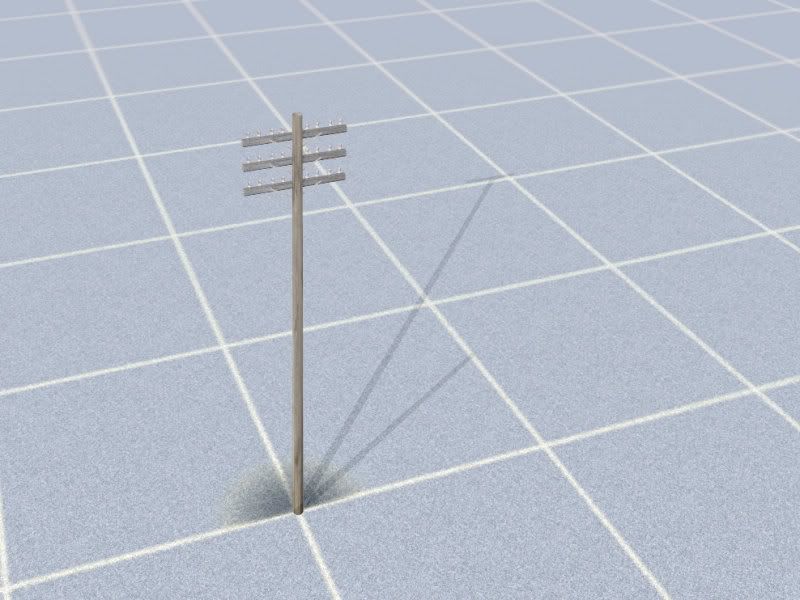
Notice the secondary shadow that when you rotate around the pole, appears to be angling into/below the ground. Notice also the single shadow for a crossbar. I'm not sure what the problem is. Any ideas anyone?
Now here's a screengrab of the 3DC hierarchy. As you should see, I have the pole itself as the Main object with each crossbar as a sub group and the shadow form also in a subgroup. The shadow group initially consisted of the shadow_telephonepole and three shadow_crossbar objects. All were uniquely named and had the stencilshadow.fx applied to the extent of my understanding. In that form the crossbars did not show up at all so I combined all of the objects into one.

One final problem is that once I export the object (BTW it seems that I have to select the entire hierarchy to get the whole object to show, is that right?)I can no longer hide any part of the object and I have to close and reopen 3DC. Any ideas on that one?
Eventually I expect to be able to do this routinely but right now it seems that every step I make is down a blind alley.
So here's the deal. I have a series of scenery objects that I have exported successfully to the sim but they didn't have shadows yet. Now that I have the basic idea I'm starting to add things to them as these are easier than an entire locomotive. It probably behoves me to say that I'm using 3D Canvas Pro and I've been working with Paul Gausden's new exporter.
I've been working on a telephone pole with three crossbars. I created an interior shape that I've called Shadow_TelephonePole. I've entered the StencilShadow.fx shader in the RailSim field and exported it through the Asset Editor.
The result is as below.
Notice the secondary shadow that when you rotate around the pole, appears to be angling into/below the ground. Notice also the single shadow for a crossbar. I'm not sure what the problem is. Any ideas anyone?
Now here's a screengrab of the 3DC hierarchy. As you should see, I have the pole itself as the Main object with each crossbar as a sub group and the shadow form also in a subgroup. The shadow group initially consisted of the shadow_telephonepole and three shadow_crossbar objects. All were uniquely named and had the stencilshadow.fx applied to the extent of my understanding. In that form the crossbars did not show up at all so I combined all of the objects into one.
One final problem is that once I export the object (BTW it seems that I have to select the entire hierarchy to get the whole object to show, is that right?)I can no longer hide any part of the object and I have to close and reopen 3DC. Any ideas on that one?
Eventually I expect to be able to do this routinely but right now it seems that every step I make is down a blind alley.