Page 1 of 1

Problems with grabbing and manipulating objects in TS 2015

Unread postPosted: Wed Nov 12, 2014 12:22 pm
by OldProf
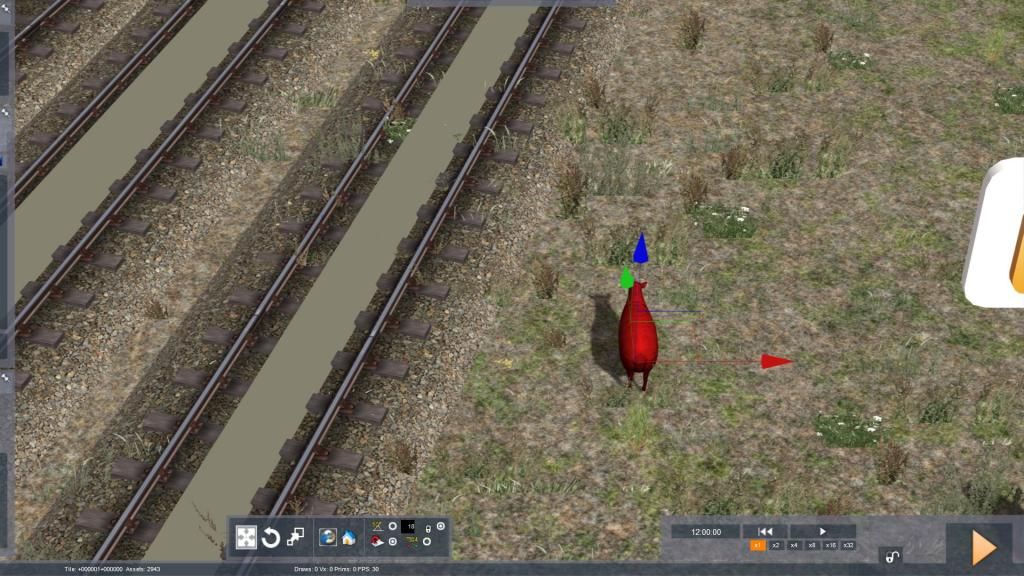
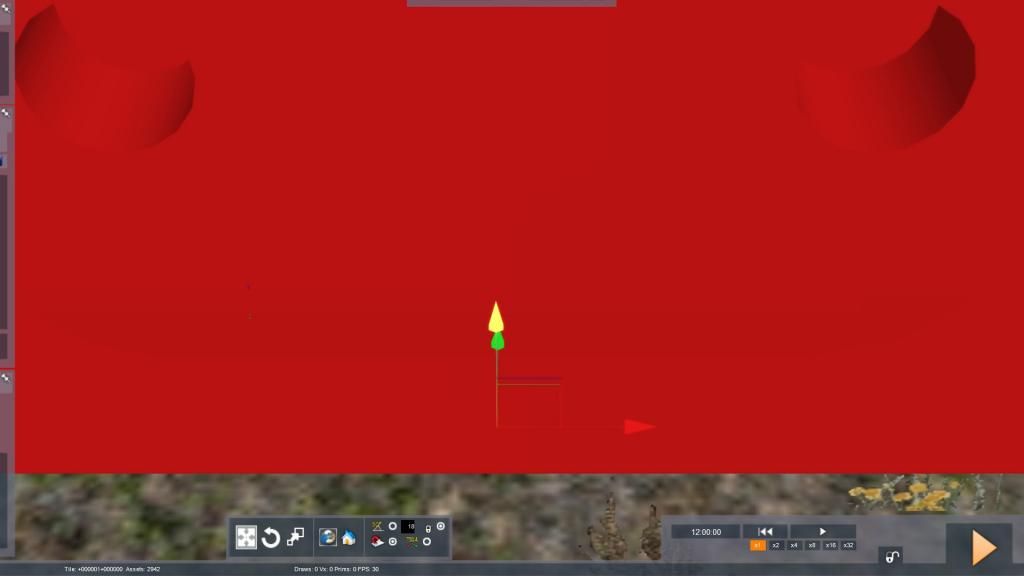
TS2015 brought with it a new look to the complex of directional arrows that appears when an object is clicked in the scenario editor. Here are two examples:
1) scenario marker (extreme closeup)
Image

2) sheep

Image

The arrows used to move the object in various directions are so small as to be nearly invisible, but can be grabbed with the mouse cursor. What I cannot figure out is how to rotate an object, which used to be very easy. I'm hoping that someone who has figured this out will provide instructions.

Thanks!

Re: Problems with grabbing and manipulating objects in TS 2015

Unread postPosted: Wed Nov 12, 2014 1:04 pm
by Chacal
In the toolbar at bottom left on your screenshot, click on the circular arrow.
The gizmo will change and you will be able to rotate objects as before.
It is easier to use local coordinates for this (click on the house icon).

Re: Problems with grabbing and manipulating objects in TS 2015

Unread postPosted: Wed Nov 12, 2014 1:13 pm
by buzz456
rotation.jpg


Click on this and it will activate the near invisible circle to go along with the near invisible other items.

Re: Problems with grabbing and manipulating objects in TS 2015

Unread postPosted: Wed Nov 12, 2014 3:40 pm
by OldProf
Many thanks to both of you! I've often wondered what that tool box contained. One of the many great things about this forum is that there are so many knowledgeable folks ready to provide valuable advice.

!*cheers*!

Re: Problems with grabbing and manipulating objects in TS 2015

Unread postPosted: Wed Nov 12, 2014 3:55 pm
by artimrj
You can also click the little radio button on the right lower corner to use the old gizmo which is what I have been doing !**duh*!!

Re: Problems with grabbing and manipulating objects in TS 2015

Unread postPosted: Thu Nov 13, 2014 6:44 am
by GreatNortherner
I'm a big fan of the new tool set in the route editor, I think it gives us much more flexibility in asset placement.

The gizmos from left to right:
- [new gizmo] shift tool
- [new gizmo] rotate tool
- [new gizmo] object scale tool (yes, it really does what it advertises: scales a selected object on the fly)

Also check the "magnet" setting in the new toolbox, it's a toggle setting for "snap to terrain" when placing objects. Especially useful if one is working a lot with copy/pasting objects.

Cheers
Michael

Re: Problems with grabbing and manipulating objects in TS 2015

Unread postPosted: Thu Jan 08, 2015 2:09 pm
by Ericmopar
Yeah, I don't like a lot of things about 2015, but the editor tools are definitely better.
Save often Tom. After using the new tools and editor for over a month I'm pretty sure it crashes more often than 2014. At least on my PC. (especially when painting terrain)
I seem to be able to place objects like vegetation as long as I can sit though...

Re: Problems with grabbing and manipulating objects in TS 2015

Unread postPosted: Thu Jan 08, 2015 6:31 pm
by XDriver
Handy little trick along with many others, (that I'm not going through all right now) is to hold the SHIFT key to make your movements of object slower and more precise and the F and G keys will rotate your objects as well. !*salute*!
There are keyboard commands for all the object movements. I just use these the most. !!*ok*!!

Re: Problems with grabbing and manipulating objects in TS 2015

Unread postPosted: Fri Jan 09, 2015 5:17 am
by Bananarama
artimrj wrote:You can also click the little radio button on the right lower corner to use the old gizmo which is what I have been doing !**duh*!!

That's what I do - easier to fiddle with. :D

Re: Problems with grabbing and manipulating objects in TS 2015

Unread postPosted: Sat Jan 10, 2015 10:59 am
by OldProf
Ericmopar wrote:Yeah, I don't like a lot of things about 2015, but the editor tools are definitely better.
Save often Tom. After using the new tools and editor for over a month I'm pretty sure it crashes more often than 2014. At least on my PC. (especially when painting terrain)
I seem to be able to place objects like vegetation as long as I can sit though...


Are you kidding? Save often? How about make no more then a few edits, save, start edited scenario, quit immediately, close and relaunch TS, rinse and repeat? Occasionally, I neglect to follow some part of this well-established mantra and wind up with a little "present": an RSC dump worth even less than the dumps my neighbors' pets occasionally deposit on my property. And that's just in scenario editing; I hesitate to think of how unstable route work must be. Yes, there are new tools, as well as numerous absolutely unexplained and therefore useless features, but stability is decidedly a non-starter in TS, just as it has been since this simulator first hit the market.

**!!2cents!!** !!jabber!! !!howdy!!

Re: Problems with grabbing and manipulating objects in TS 2015

Unread postPosted: Sat Jan 10, 2015 11:10 am
by artimrj
Ah, well, I worked the NERW for 1900 hours, had very few problems. Been working on the Lafayette for over a year now with Buzz, Roy & John and have had no problems. Buzz has a Google Earth problem at the moment, but all is well for us.

Maybe your not holding your tongue right ? !*roll-laugh*!

Re: Problems with grabbing and manipulating objects in TS 2015

Unread postPosted: Sat Jan 10, 2015 1:24 pm
by buzz456
I have been working on the route for the same time as Bob try to remember to hit the F2 key every five to ten minutes and always hit it just before I exit the world editor. It has dumped to desk top maybe a half dozen times over the last year. Every time all of the changes I made are still there when I restart. I would call the stability good to excellent on two different computers that I work on.

Re: Problems with grabbing and manipulating objects in TS 2015

Unread postPosted: Sat Jan 10, 2015 7:47 pm
by Ericmopar
I'll have to try that Buzz. I'd never heard of hitting F-2 before.

Later that night...

Thank you Buzz. I hadnt' heard of that F-2 Save method that keeps a person in the editor after saving. That makes doing editor work much more fun.