RW3 and track creation

Discussion about RailWorks route design.

RW3 and track creation

Unread postby SAR704 » Sat Oct 08, 2011 9:15 pm

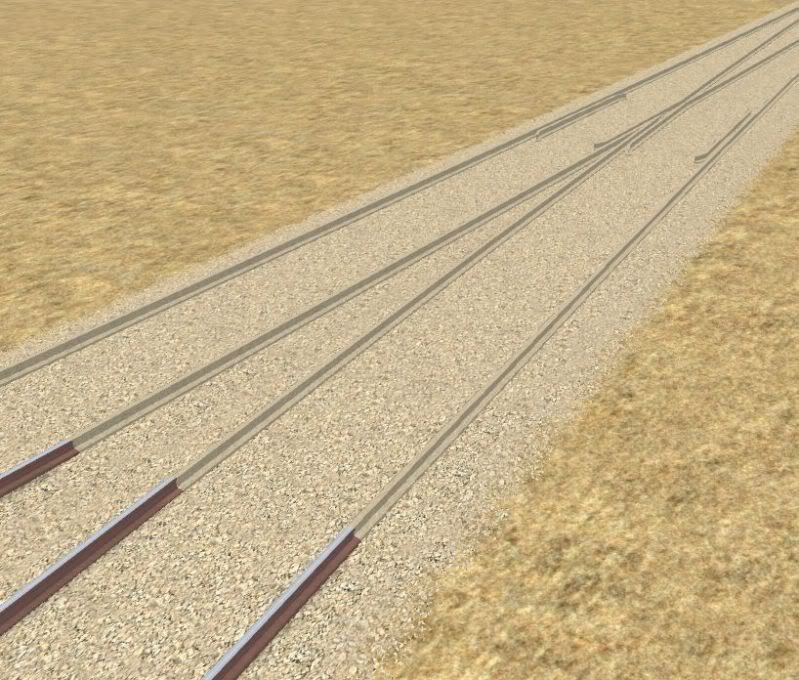
For some reason, RW3 is displaying my track incorrectly. Instead of displaying the texture I applied to the track cross section cap in 3d Crafter, it is covering the rail with the ballast texture. I have set everything up exactly as I did when the track was built for RW2. Now that the update has been released, none of my custom track has displayed correctly.

After retexturing the model, and importing it from TSM again, the normal track then showed up properly, but this problem persists with the model that is used the render the points as shown in this shot. The normal track without junctions is displayed to the left as indicated by the rail appearing correctly. The sleepers have been left out for now.
Image

It seems that the release of RW3 has made the task of track creation even more frustrating and fiddly than it was in RW2.

In 3d Crafter, the rail is at exactly the same origin as the ballast, and the tops of both objects are at ground level as required. The Rail is set up as a child of the ballast, with Rail, and Ballast in the respective Rail Sim custom fields that appears at the bottom when you use ctrl + double click. These settings seem to be what affects it the most, but I cannot work out what it is I am doing wrong. Maybe some rules have changed concerning track since RW3's release, but most other track systems (including the default track) display correctly.

In short, this is puzzling.....
Geforce GTX 1060
16GB RAM
Intel Core i5-3350 3.10ghz
Win te(n) Home
SAR704
 
Posts: 716
Joined: Tue Jun 21, 2011 9:48 am
Location: Adelaide, South Australia

Re: RW3 and track creation

Unread postby SCLALINE » Sat Oct 08, 2011 10:19 pm

i know scalerail shows perfectly
User avatar
SCLALINE
 
Posts: 672
Joined: Sun Oct 03, 2010 10:19 am
Location: Orlando, FL

Re: RW3 and track creation

Unread postby Bananarama » Sun Oct 09, 2011 1:29 am

ScaleRail is not without its faults - I'm still trying to track down an issue where large yards cause an SBHH error. I haven't yet nailed down if it's the number of polys or the number of materials or a combination of the two - reducing the poly count works with the same number of materials, and a reduction of materials works if I reduce the polys. Works perfectly well for the Barstow yard in the SR Cajon conversion, but things didn't go so well with Selkirk (there's a lot more going on there, especially with an 80-track hump). Works perfectly well in Rail Simulator, however, and worked fine up until an RW2 update in July.

As for your track, have you opened the exported file in RW_Tools? Perhaps the utility will shed light as to why the materials are mixed up.
Cheers!
Marc - 3DTrains

Image
User avatar
Bananarama
 
Posts: 2749
Joined: Sat Feb 14, 2009 1:17 am
Location: Another Planet

Re: RW3 and track creation

Unread postby SMMDigital » Sun Oct 09, 2011 8:03 am

I have no issues with ScaleRail so far at Debutts - smaller yard, of course - and no reported issues at Inman on the AND route.
SMMDigital
 

Re: RW3 and track creation

Unread postby eyein12 » Sun Oct 09, 2011 9:32 am

no issues here, interbay yards, balmer, argo, and king yards are working fine. they are large yards.
Home of the NEW TIER 4 GEVO PACK, SD90/80mac PACK, BNSF SEATTLE SUBDIVISION ROUTE,UPDATES and more...

http://eyein12.blogspot.com/

https://www.youtube.com/channel/UCtWF-X ... dY7ag/feed
eyein12
 
Posts: 1258
Joined: Fri Oct 15, 2010 9:47 am
Location: Pottstown, PA USA

Re: RW3 and track creation

Unread postby barnez » Sun Oct 09, 2011 10:57 am

Yards on my route are not as large as Selkirk, but still pretty expansive - I have no SBHH errors.

One issue I have seen however - tight radius curves with a junction - the inner rail on one side does not render, not sure if this is just my old video card, something with ScaleRail, or RW3.

Sorry, no screens to illustrate, @ work today - ok - saw the sceens Styckx posted here:

viewtopic.php?f=6&t=3599

similar issue I'm seeing

-barnez
User avatar
barnez
 
Posts: 274
Joined: Thu Jul 21, 2011 11:21 pm

Re: RW3 and track creation

Unread postby spec5sx » Sun Oct 09, 2011 4:47 pm

The yard I have in my current W.I.P route is about 4 miles long and 64 tracks wide at it's widest point. Amazingly, I can now get Scale Rail to work without SBHH since the update. Now however, laying an offset loft with Scale Rail causes SBHH repeatably . So I had to switch it back.

You folks out there might think I'm crazy, but I've had all kinds of stability issues with the WE ever since they brought back the ability to lay track using the offset tool.
The word?..The word is no. I am, therefore, going anyway..
User avatar
spec5sx
 
Posts: 213
Joined: Sat Mar 07, 2009 9:39 pm

Re: RW3 and track creation

Unread postby imnew » Tue Oct 11, 2011 1:29 am

No problems here, mind you my yards are not as huge as Selkirk, but they are quite large .
Intel Core I7-7770K, ZOTAC GTX 1080 Ti AMP
Extreme, ASUS ROG Strix Z270H, 16 GB HyperX Fury DDR4, Samsung 850 EVO 500GB, Corsair Force MP500 240GB M.2, 34" Ultra Wide Samsung Monitor
User avatar
imnew
 
Posts: 2456
Joined: Tue Aug 25, 2009 1:41 pm


Return to Route Design

Who is online

Users browsing this forum: No registered users and 17 guests