RW3 and track creation
 Posted: Sat Oct 08, 2011 9:15 pm
For some reason, RW3 is displaying my track incorrectly. Instead of displaying the texture I applied to the track cross section cap in 3d Crafter, it is covering the rail with the ballast texture. I have set everything up exactly as I did when the track was built for RW2. Now that the update has been released, none of my custom track has displayed correctly.
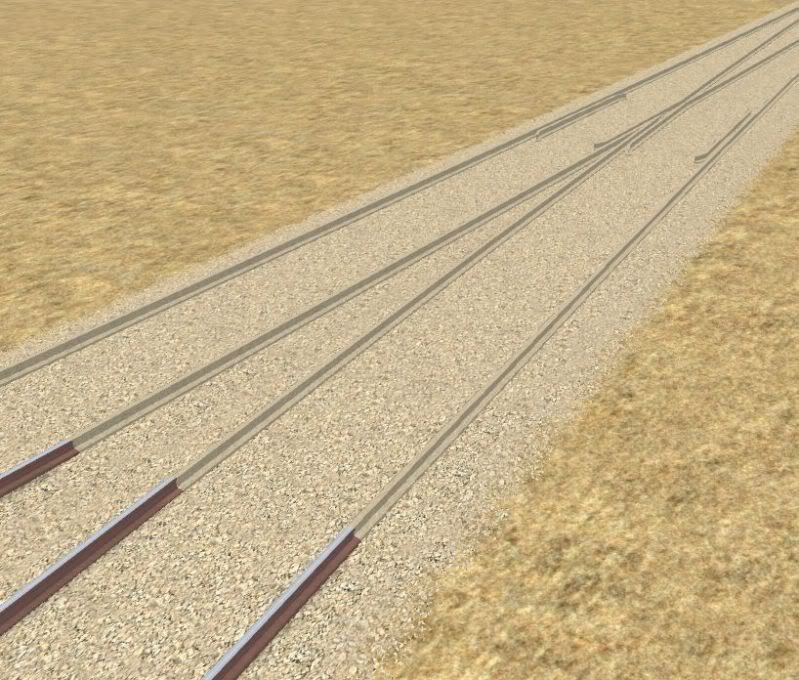
After retexturing the model, and importing it from TSM again, the normal track then showed up properly, but this problem persists with the model that is used the render the points as shown in this shot. The normal track without junctions is displayed to the left as indicated by the rail appearing correctly. The sleepers have been left out for now.
It seems that the release of RW3 has made the task of track creation even more frustrating and fiddly than it was in RW2.
In 3d Crafter, the rail is at exactly the same origin as the ballast, and the tops of both objects are at ground level as required. The Rail is set up as a child of the ballast, with Rail, and Ballast in the respective Rail Sim custom fields that appears at the bottom when you use ctrl + double click. These settings seem to be what affects it the most, but I cannot work out what it is I am doing wrong. Maybe some rules have changed concerning track since RW3's release, but most other track systems (including the default track) display correctly.
In short, this is puzzling.....
After retexturing the model, and importing it from TSM again, the normal track then showed up properly, but this problem persists with the model that is used the render the points as shown in this shot. The normal track without junctions is displayed to the left as indicated by the rail appearing correctly. The sleepers have been left out for now.
It seems that the release of RW3 has made the task of track creation even more frustrating and fiddly than it was in RW2.
In 3d Crafter, the rail is at exactly the same origin as the ballast, and the tops of both objects are at ground level as required. The Rail is set up as a child of the ballast, with Rail, and Ballast in the respective Rail Sim custom fields that appears at the bottom when you use ctrl + double click. These settings seem to be what affects it the most, but I cannot work out what it is I am doing wrong. Maybe some rules have changed concerning track since RW3's release, but most other track systems (including the default track) display correctly.
In short, this is puzzling.....