
For some reason, the Scaleroad loft renders when the gradient is set to 0. But as soon as I change it to anything else (1in XXX) and attempt to place the road, the yellow outline of the loft disappears and I can't place it. What am I doing wrong here?
The blueprint for the route is set to display the gradient as 1 in XXX. Is this setting ok for using Scaleroad?
Problem with Scaleroad
First unread post • 12 posts
• Page 1 of 1
Problem with Scaleroad
 by SAR704 » Fri Jan 30, 2015 2:16 am
Geforce GTX 1060
16GB RAM
Intel Core i5-3350 3.10ghz
Win te(n) Home
16GB RAM
Intel Core i5-3350 3.10ghz
Win te(n) Home
- SAR704
- Posts: 716
- Joined: Tue Jun 21, 2011 9:48 am
- Location: Adelaide, South Australia
Re: Problem with Scaleroad
by Bananarama » Fri Jan 30, 2015 11:57 am
It should be, although I use %. You must be doing something daffy - the roads have been out for more than 5 years, and I've never heard of this issue.

-

Bananarama - Posts: 2749
- Joined: Sat Feb 14, 2009 1:17 am
- Location: Another Planet
Re: Problem with Scaleroad
by SAR704 » Sat Jan 31, 2015 2:37 am
It's ok Marc. I wasn't aware that at the bottom of the window which specifies the gradient etc, it shows a selection for track or road etc. I set it to road only and the problem went away.
It's been that long since I've laid roads in RW...
It's been that long since I've laid roads in RW...
Geforce GTX 1060
16GB RAM
Intel Core i5-3350 3.10ghz
Win te(n) Home
16GB RAM
Intel Core i5-3350 3.10ghz
Win te(n) Home
- SAR704
- Posts: 716
- Joined: Tue Jun 21, 2011 9:48 am
- Location: Adelaide, South Australia
Re: Problem with Scaleroad
by SAR704 » Sat Jul 11, 2015 8:54 pm
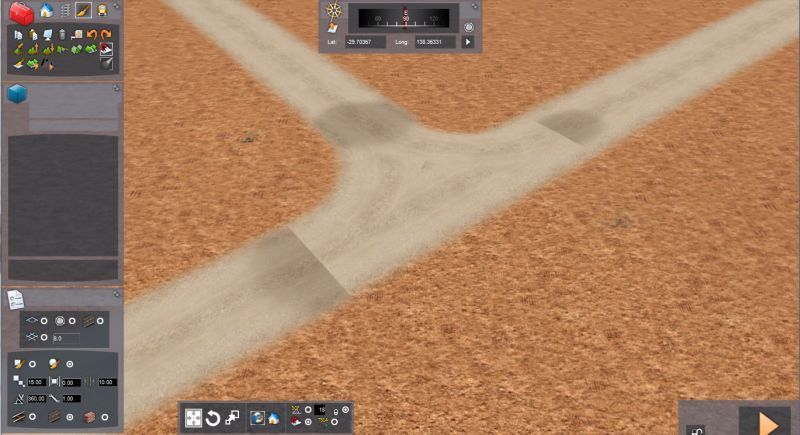
Just wondering, is there a way to get rid of/hide these grey bits at the end of a road section?

Geforce GTX 1060
16GB RAM
Intel Core i5-3350 3.10ghz
Win te(n) Home
16GB RAM
Intel Core i5-3350 3.10ghz
Win te(n) Home
- SAR704
- Posts: 716
- Joined: Tue Jun 21, 2011 9:48 am
- Location: Adelaide, South Australia
Re: Problem with Scaleroad
by Bananarama » Sat Jul 11, 2015 9:11 pm
If the pieces aren't properly joined, the lofts will render an end shape.
-
Bananarama - Posts: 2749
- Joined: Sat Feb 14, 2009 1:17 am
- Location: Another Planet
Re: Problem with Scaleroad
by barnez » Sun Jul 12, 2015 10:33 am
Additionally, because RW doesn't allow welded joints a the roadway intersections, gravel/ dirt roads from ScaleRoad pack render as seen in your screenshot. The only way I've found to get around it is avoid intersection pieces and bury the ends of the roadway lofts.
-barnez
-barnez
-

barnez - Posts: 274
- Joined: Thu Jul 21, 2011 11:21 pm
Re: Problem with Scaleroad
by Bananarama » Sun Jul 12, 2015 11:32 pm
Yes, and why I also avoid dirt intersections. What I thought to be a good idea didn't pan out that way.
-
Bananarama - Posts: 2749
- Joined: Sat Feb 14, 2009 1:17 am
- Location: Another Planet
Re: Problem with Scaleroad
by SAR704 » Thu Jul 30, 2015 3:35 am
Found a way to eliminate this annoyance, by adding a small section on a steep gradient that goes under the terrain.
Geforce GTX 1060
16GB RAM
Intel Core i5-3350 3.10ghz
Win te(n) Home
16GB RAM
Intel Core i5-3350 3.10ghz
Win te(n) Home
- SAR704
- Posts: 716
- Joined: Tue Jun 21, 2011 9:48 am
- Location: Adelaide, South Australia
Re: Problem with Scaleroad
by SAR704 » Tue Oct 06, 2015 6:24 am
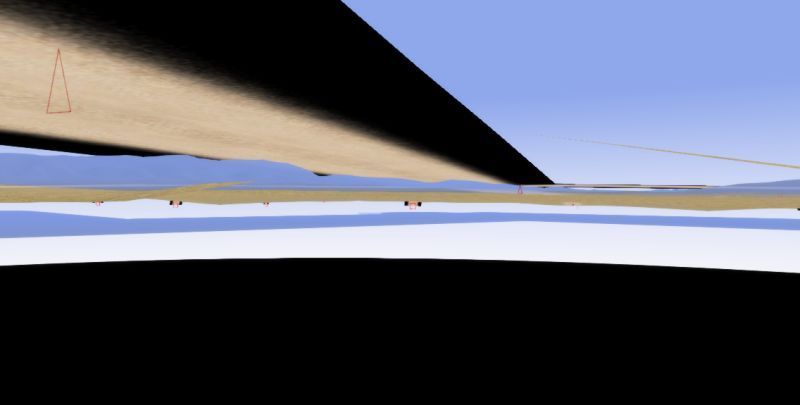
I thought I'd ask regarding this in particular. It's regarding the black texture at the bottom of the loft. Usually, this isn't visible, but if I place the road over a narrow bridge, then there's a chance this will show. Is this due to no alpha being at the bottom of the loft, or another issue? I haven't created road lofts for RW, so not sure.
If the former, would it be possible to update Scaleroad with a fix for this?
If the former, would it be possible to update Scaleroad with a fix for this?

Geforce GTX 1060
16GB RAM
Intel Core i5-3350 3.10ghz
Win te(n) Home
16GB RAM
Intel Core i5-3350 3.10ghz
Win te(n) Home
- SAR704
- Posts: 716
- Joined: Tue Jun 21, 2011 9:48 am
- Location: Adelaide, South Australia
Re: Problem with Scaleroad
by Bananarama » Tue Oct 06, 2015 12:20 pm
Can't be fixed. RSC/DTG changed the way lofts were drawn sometime ago. Best to use a bridge in those circumstances.
-
Bananarama - Posts: 2749
- Joined: Sat Feb 14, 2009 1:17 am
- Location: Another Planet
Re: Problem with Scaleroad
by SAR704 » Fri Mar 25, 2016 6:47 am
When placing roads with track going through it at a crossing for example, I noticed that with TS2015, I could place a track section with sleepers painted on, due to the road loft hiding most 3d objects except for the base track loft. For some reason now, I can't use this trick with crossings, and all I see is two rails without ballast and sleepers. I notice that only newly exported track has this problem, not older track sections from last year.
Here's an example
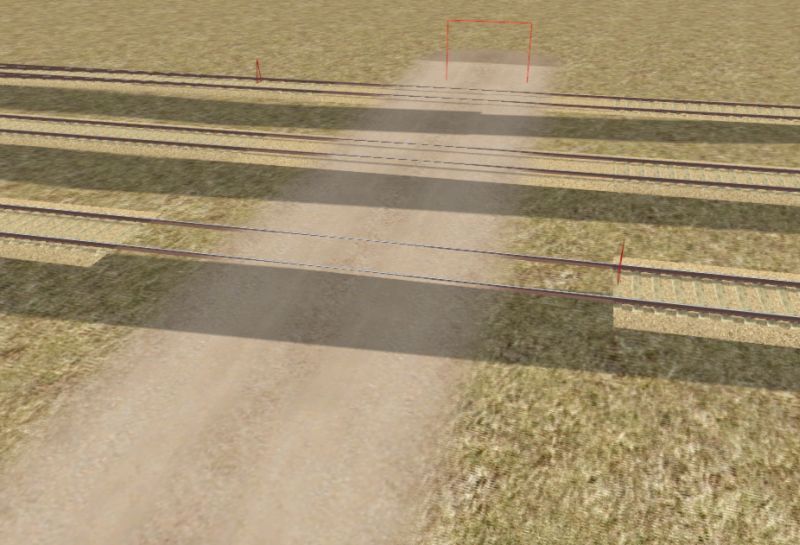
Is there a work around for this? I'm not sure what update to TS created this annoyance, but it is a PITA.
Here's an example

Is there a work around for this? I'm not sure what update to TS created this annoyance, but it is a PITA.
Geforce GTX 1060
16GB RAM
Intel Core i5-3350 3.10ghz
Win te(n) Home
16GB RAM
Intel Core i5-3350 3.10ghz
Win te(n) Home
- SAR704
- Posts: 716
- Joined: Tue Jun 21, 2011 9:48 am
- Location: Adelaide, South Australia
Re: Problem with Scaleroad
by Bananarama » Fri Mar 25, 2016 1:54 pm
It may be that the the .fx material settings for the track object are wrong. If you used LoftTexDiffAlpha, use LoftTexDiffTrans instead.
-
Bananarama - Posts: 2749
- Joined: Sat Feb 14, 2009 1:17 am
- Location: Another Planet
12 posts
• Page 1 of 1
Who is online
Users browsing this forum: No registered users and 20 guests