
Smoothing out Jagged Edges
First unread post • 4 posts
• Page 1 of 1
Smoothing out Jagged Edges
 by Shortliner » Wed Sep 21, 2011 9:10 pm
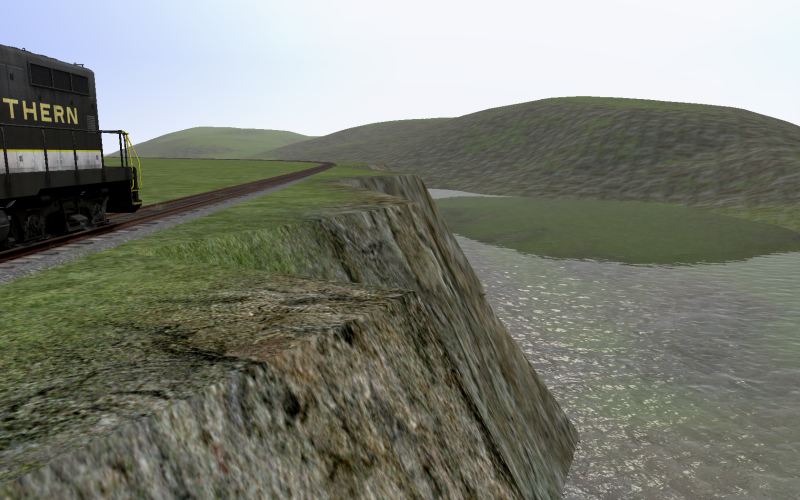
So, I've been working on smoothing out the jagged edge of the cliffs of my route. However what ends up happening is that I use the smooth tool, and then I'd have to use the "snap to track" tool to bring the terrain back to the tracks, and the jagged edges would return. Does anyone have any hints or tricks in smoothing out the jagged edges?
- Shortliner
- Posts: 646
- Joined: Thu Aug 06, 2009 9:44 pm
Re: Smoothing out Jagged Edges
by Toripony » Wed Sep 21, 2011 11:19 pm
Set Brush Width to 10.0, Brush Falloff to 0.3 to 0.5 and same for Speed, then adjust each point individually. The smoothing technique you're trying will work on lesser slopes but for the slope you show in the pic, one-at-a-time is your best (but slowest) bet. Lower the point to 45-60 degrees and raise up the notch between points and you'll get an overall reasonable slope that will look fine with foliage.
-

Toripony - Posts: 1083
- Joined: Thu Jun 04, 2009 3:13 am
Re: Smoothing out Jagged Edges
by Bananarama » Thu Sep 22, 2011 6:44 am
Yep - I do the same as Tori. Best results, albeit at a tedious pace.

-

Bananarama - Posts: 2749
- Joined: Sat Feb 14, 2009 1:17 am
- Location: Another Planet
Re: Smoothing out Jagged Edges
by PapaXpress » Thu Sep 22, 2011 9:44 am
Thanks Tori, I've been looking for this too.
"Just post some random unrelated text. We have members here who can help you with that." ~ Chacal
"When all else fails, read the instructions... if that doesn't work either, try following them." ~ Old Prof
The Grade Crossing - Atlanta North Project - Virtual Rail Creations
-

PapaXpress - Posts: 5147
- Joined: Sat Oct 23, 2010 10:30 pm
- Location: that "other" timezone
4 posts
• Page 1 of 1
Who is online
Users browsing this forum: No registered users and 1 guest