Rail Runner Repaint Request

In this forum you can make SUGGESTIONS for repaints and/or other downloads. If you are suggesting repaints of something, please supply a picture of it. Make it easier for the painter.

Rail Runner Repaint Request

Unread postby stationmaster101 » Sun Dec 07, 2014 4:04 pm

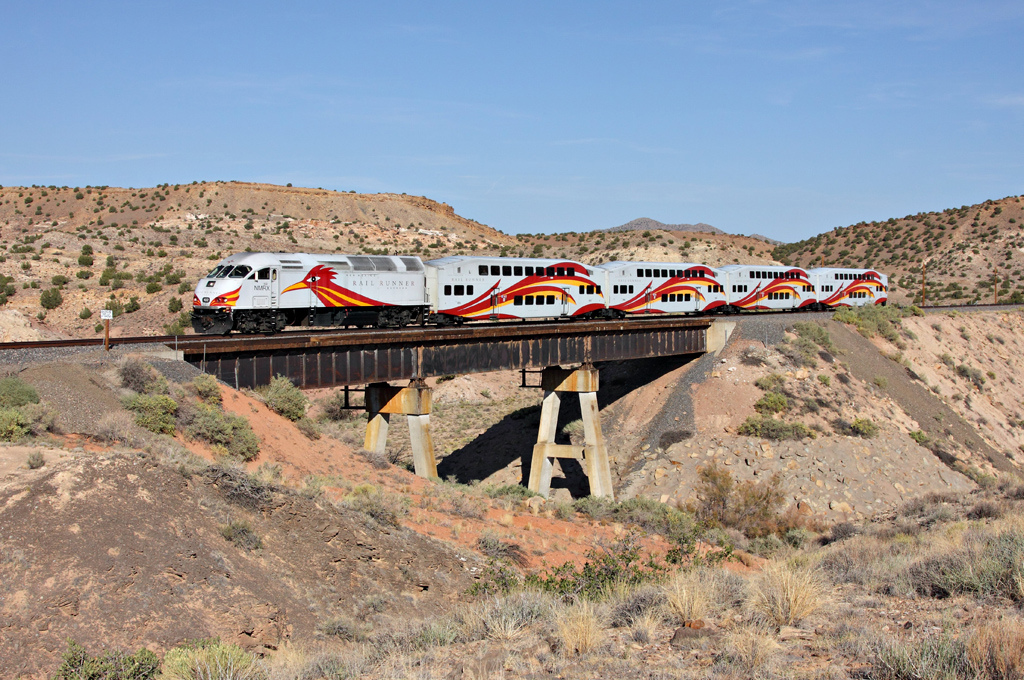
Well since I'm probably the worst at repainting engines myself, I was hoping someone with more experience could make the Santa Fe to Albuquerque commuter train called the rail runner. I would suggest repainting either the San Diego Commuter Rail F59PHI DLC or the F59PHI from the Pacific Surfliner DLC. Would greatly appreciate anyone who can do this since i need this train to make the Santa Fe to Albuquerque commuter route that i plan on constructing. Now for some pictures to help the painter :D
Image
Image
Image
Image
And here is the logo
Image
Stationmaster
User avatar
stationmaster101
 
Posts: 134
Joined: Tue Oct 07, 2014 6:37 pm

Re: Rail Runner Repaint Request

Unread postby Merlin75 » Thu Dec 11, 2014 4:35 am

You might not find anyone to do these due to the fact that the F59's are so hard to repaint and that some repaints will need child objects made.
Merlin75
 
Posts: 501
Joined: Tue Oct 04, 2011 5:17 am
Location: Cornwall

Re: Rail Runner Repaint Request

Unread postby Chacal » Thu Dec 11, 2014 2:58 pm

Too bad because this is an awesome livery.
Over the hill and gathering speed
Chacal
Site Admin
 
Posts: 6549
Joined: Tue Jul 05, 2011 1:11 pm
Location: Quebec, Canada

Re: Rail Runner Repaint Request

Unread postby JohnTrainHead » Thu Dec 11, 2014 3:22 pm

Now if only we had an MP36...
John Gori
User avatar
JohnTrainHead
 
Posts: 940
Joined: Sun Sep 08, 2013 10:54 am
Location: Maryland

Re: Rail Runner Repaint Request

Unread postby Marleyman » Tue Dec 16, 2014 11:53 am

Ok, if I work really hard on this it may just be possible...

RR 1.JPG


No promises as this has taken me six hours solid work so far and It is, as you see, a mess, but I hope that is because I am just testing the texture map for now to see what lines up where.

As you can see, it's a Laff!

its a laff.JPG
You do not have the required permissions to view the files attached to this post.
My Railworks 2 Catalogue; http://www.railworks.marleyman.co.uk/
and My RWTS2013 Download Store http://www.railworks.marleyman.co.uk/store/
User avatar
Marleyman
 
Posts: 357
Joined: Fri Dec 10, 2010 4:46 pm
Location: UK

Re: Rail Runner Repaint Request

Unread postby Chacal » Tue Dec 16, 2014 1:07 pm

Long time no see, Marleyman.
Welcome back!
Over the hill and gathering speed
Chacal
Site Admin
 
Posts: 6549
Joined: Tue Jul 05, 2011 1:11 pm
Location: Quebec, Canada

Re: Rail Runner Repaint Request

Unread postby Marleyman » Tue Dec 16, 2014 2:27 pm

Chacal wrote:Long time no see, Marleyman.
Welcome back!


Thank you.

Ok, it cannot be done and here is why:

The section of the 'beak' highlighted by the arrows is the troublesome part...

part.JPG


That part is from this section of the texture map and as you can see on the model it appears in two different places. So those two specific parts on the model are covered by just one texture.

map.JPG


I should also point out that the first image has the right hand side of the model flipped to best demonstrate the issue.

I would think other liveries could be done but this one cannot be done without child objects which are beyond my skill-set.
You do not have the required permissions to view the files attached to this post.
My Railworks 2 Catalogue; http://www.railworks.marleyman.co.uk/
and My RWTS2013 Download Store http://www.railworks.marleyman.co.uk/store/
User avatar
Marleyman
 
Posts: 357
Joined: Fri Dec 10, 2010 4:46 pm
Location: UK

Re: Rail Runner Repaint Request

Unread postby buzz456 » Tue Dec 16, 2014 2:57 pm

Which brings me to the question, is there a tutorial out there anywhere about creating child objects?
Buzz
39 and holding.
"Some people find fault like there's a reward for it."- Zig Ziglar
"If you can dream it you can do it."- Walt Disney
Image
User avatar
buzz456
Site Admin
 
Posts: 21139
Joined: Sun Mar 21, 2010 8:30 am
Location: SW Florida

Re: Rail Runner Repaint Request

Unread postby PapaXpress » Tue Dec 16, 2014 11:29 pm

What specifically would you like to see in that tutorial? I will tell you from experience that Mike and I did all our child placement using trial and error. You can only use the BPE to place children when you have the IGS files.
Image
"Just post some random unrelated text. We have members here who can help you with that." ~ Chacal
"When all else fails, read the instructions... if that doesn't work either, try following them." ~ Old Prof
Image
The Grade Crossing - Atlanta North Project - Virtual Rail Creations
User avatar
PapaXpress
 
Posts: 5147
Joined: Sat Oct 23, 2010 10:30 pm
Location: that "other" timezone

Re: Rail Runner Repaint Request

Unread postby Marleyman » Wed Dec 17, 2014 5:01 am

If I take this skin as a project for creating a child object, a guide could start there.

Questions I would have are;

What do you mean by 'BPE' and 'IGS'?

How do I know what size to make the Plane that would be required to sit at the side of the Loco?

What tools are required? (Blender, Photoshop...)

Does the plane need to be textured (painted) before export from Blender?

EDIT:
I have Blender 2.71 installed and I have added 'io_export_ia.py' and 'io_export_igs.py' to the addons folder. Now reading 'Blender 2.6x Train Simulator 20xx export' by DOM107
My Railworks 2 Catalogue; http://www.railworks.marleyman.co.uk/
and My RWTS2013 Download Store http://www.railworks.marleyman.co.uk/store/
User avatar
Marleyman
 
Posts: 357
Joined: Fri Dec 10, 2010 4:46 pm
Location: UK

Re: Rail Runner Repaint Request

Unread postby PapaXpress » Wed Dec 17, 2014 6:48 am

Marleyman wrote:If I take this skin as a project for creating a child object, a guide could start there.

Questions I would have are;

What do you mean by 'BPE' and 'IGS'?


Blue Print Editor, IGS.... Intermedia Geometry, errr idonno. Anyway the IGS file is the file which Blender, or 3DC, or Max would export. This file in turn is compiled into a GEO by the BPE (once you fill in all the blanks). You can read through my tutorial to see how that works.
http://thegradecrossing.blogspot.com/20 ... tents.html

Marleyman wrote:How do I know what size to make the Plane that would be required to sit at the side of the Loco?


I have had to make a best guess as to the size of the shape. Since it sounds like you want to make a decal, just drop a box on to workspace (blender defaults with one), remove all faces but one, resize, texture, add material, and export. Update: you probably want to which material to use. I would go with TrainDecal.fx, For an LOD use 1_1000_ since its just a face, and for your texture (ACE) 10 layers would work nice with an LOD of 1000. Again the context is a single face, if it were a more complex model we could talk more about this (see the locomotive tutorial for an idea).

Marleyman wrote:What tools are required? (Blender, Photoshop...)


Yup, but read the tutorials (mine and blenders). Translating from 3DC to Blender may take a bit, but if I can do it then is it not impossible.

Marleyman wrote:Does the plane need to be textured (painted) before export from Blender?


Yes. This is the case for any modeling program you use.

Marleyman wrote:EDIT:
I have Blender 2.71 installed and I have added 'io_export_ia.py' and 'io_export_igs.py' to the addons folder. Now reading 'Blender 2.6x Train Simulator 20xx export' by DOM107


It will still work. We (VRC) are using blender for our next locomotive.

Once you get this far, we can then add it as a child. Yes, any model can be added to another as a child. Please read this:
http://thegradecrossing.blogspot.com/20 ... ldren.html
Image
"Just post some random unrelated text. We have members here who can help you with that." ~ Chacal
"When all else fails, read the instructions... if that doesn't work either, try following them." ~ Old Prof
Image
The Grade Crossing - Atlanta North Project - Virtual Rail Creations
User avatar
PapaXpress
 
Posts: 5147
Joined: Sat Oct 23, 2010 10:30 pm
Location: that "other" timezone

Re: Rail Runner Repaint Request

Unread postby Marleyman » Thu Dec 18, 2014 10:02 am

Is this what I need?

test.JPG


To the best of my knowledge this is a textured single plane object. Looks terrible to me.
You do not have the required permissions to view the files attached to this post.
My Railworks 2 Catalogue; http://www.railworks.marleyman.co.uk/
and My RWTS2013 Download Store http://www.railworks.marleyman.co.uk/store/
User avatar
Marleyman
 
Posts: 357
Joined: Fri Dec 10, 2010 4:46 pm
Location: UK

Re: Rail Runner Repaint Request

Unread postby OpenRailer90 » Thu Dec 18, 2014 10:40 am

The RailRunner MP36PH-3C does not have strobes in real life; why not use the Amtrak version as a basis?
OpenRailer90
 
Posts: 1720
Joined: Tue Jun 24, 2014 6:34 pm

Re: Rail Runner Repaint Request

Unread postby PapaXpress » Thu Dec 18, 2014 11:03 am

You are stretching the texture. Create a texture in proportion to the face you created.
Image
"Just post some random unrelated text. We have members here who can help you with that." ~ Chacal
"When all else fails, read the instructions... if that doesn't work either, try following them." ~ Old Prof
Image
The Grade Crossing - Atlanta North Project - Virtual Rail Creations
User avatar
PapaXpress
 
Posts: 5147
Joined: Sat Oct 23, 2010 10:30 pm
Location: that "other" timezone

Re: Rail Runner Repaint Request

Unread postby Marleyman » Fri Dec 19, 2014 8:22 am

Well making this square took longer than I expected. I think I broke blender twice.

rrsquare.JPG


Now that I have a Square Plane with the texture on it I am at a loss as to what I should do now. I do know there are naming constraints I need to be aware of but other than that, I have no clue.
You do not have the required permissions to view the files attached to this post.
My Railworks 2 Catalogue; http://www.railworks.marleyman.co.uk/
and My RWTS2013 Download Store http://www.railworks.marleyman.co.uk/store/
User avatar
Marleyman
 
Posts: 357
Joined: Fri Dec 10, 2010 4:46 pm
Location: UK

Next

Return to Model/Repaint Suggestions

Who is online

Users browsing this forum: No registered users and 1 guest