
Blender to TS2014
Re: Blender to TS2014
 by PapaXpress » Sun Oct 13, 2013 11:50 am
I am on the road right now, but it sounds like you need to unwrap the model. This is an essential step in every 3d model software. In my basic tutorials I use the paint brush which is a shortcut to do an unwrap.
"Just post some random unrelated text. We have members here who can help you with that." ~ Chacal
"When all else fails, read the instructions... if that doesn't work either, try following them." ~ Old Prof
The Grade Crossing - Atlanta North Project - Virtual Rail Creations
-

PapaXpress - Posts: 5147
- Joined: Sat Oct 23, 2010 10:30 pm
- Location: that "other" timezone
Re: Blender to TS2014
by WVRR1964 » Sun Oct 13, 2013 1:17 pm
PapaXpress wrote:I am on the road right now, but it sounds like you need to unwrap the model. This is an essential step in every 3d model software. In my basic tutorials I use the paint brush which is a shortcut to do an unwrap.
If you mean UV mapping process, yes I know. All the UV maps have been deleted associated with this model. I have a new texture standing by. My real interest is the shader names...for example- The insulators on the pole are shinny and have a hard surface. Does the specular setting in Blender take care of this or do I need a different shader name?
- WVRR1964
- Posts: 105
- Joined: Thu Oct 03, 2013 12:50 pm
Re: Blender to TS2014
by PapaXpress » Sun Oct 13, 2013 1:31 pm
This is list is 3DC centric, but many of the shaders are named the same for Blender:
http://thegradecrossing.blogspot.com/20 ... rials.html
80% of the time for scenery, TrainBasicObjectDiffuse is going to be the one you need. There is an excellent thread Derek posted here back when released TS2012 where he spoke about the newer shaders (at that time) and their uses.
http://thegradecrossing.blogspot.com/20 ... rials.html
80% of the time for scenery, TrainBasicObjectDiffuse is going to be the one you need. There is an excellent thread Derek posted here back when released TS2012 where he spoke about the newer shaders (at that time) and their uses.
"Just post some random unrelated text. We have members here who can help you with that." ~ Chacal
"When all else fails, read the instructions... if that doesn't work either, try following them." ~ Old Prof
The Grade Crossing - Atlanta North Project - Virtual Rail Creations
-
PapaXpress - Posts: 5147
- Joined: Sat Oct 23, 2010 10:30 pm
- Location: that "other" timezone
Re: Blender to TS2014
by RvA944 » Sun Oct 13, 2013 1:56 pm
"Just smile and wave boy's, just smile and wave"
-

RvA944 - Posts: 210
- Joined: Sat Jul 13, 2013 9:35 pm
- Location: N.E. PA
Re: Blender to TS2014
by WVRR1964 » Sun Oct 13, 2013 2:33 pm
Here is where I'm at... I've added the shader and texture. I then set the UV mapping. Is there anything else I need to look at?
Since the same material & shader is assigned to all the parts of the model, I can't see how the Blender's specular settings can work. Oh well, I'll figure this out...this is only the beginning!
Since the same material & shader is assigned to all the parts of the model, I can't see how the Blender's specular settings can work. Oh well, I'll figure this out...this is only the beginning!
You do not have the required permissions to view the files attached to this post.
- WVRR1964
- Posts: 105
- Joined: Thu Oct 03, 2013 12:50 pm
Re: Blender to TS2014
by PapaXpress » Sun Oct 13, 2013 3:24 pm
So there should be (somewhere) a section called Influence:
As for the settings, I cannot say. I could tell you what I use for 3DC, but I am sure they will not be the same for Blender. I can say that your Diffuse to something low (ex 35) and your ambient to something even lower (ex 4) will give you an idea of what you need.
From 3DC. Specular and Translucent are not used in the final IGS so you can set them to 0.
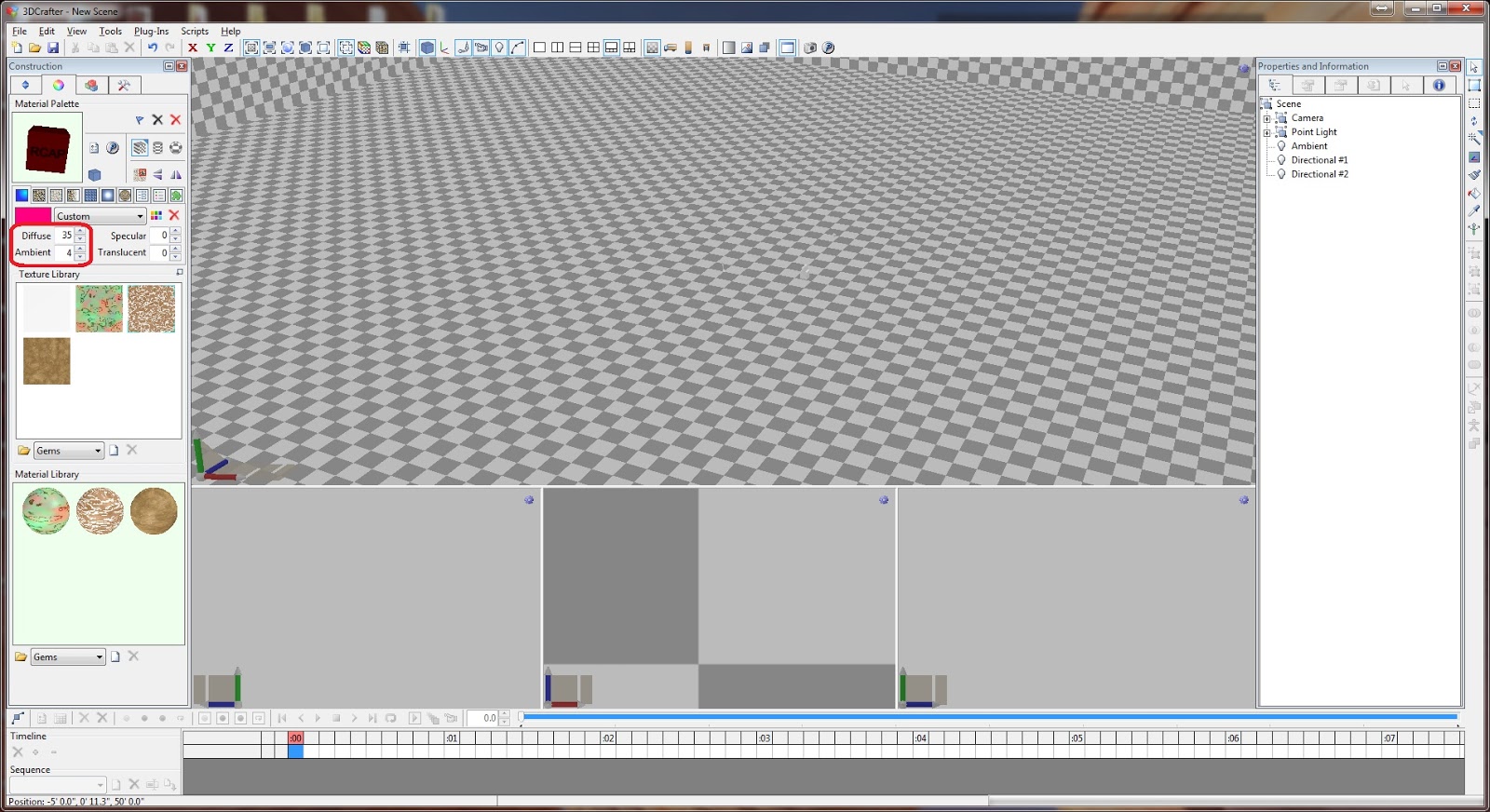
As for the settings, I cannot say. I could tell you what I use for 3DC, but I am sure they will not be the same for Blender. I can say that your Diffuse to something low (ex 35) and your ambient to something even lower (ex 4) will give you an idea of what you need.
From 3DC. Specular and Translucent are not used in the final IGS so you can set them to 0.
You do not have the required permissions to view the files attached to this post.
"Just post some random unrelated text. We have members here who can help you with that." ~ Chacal
"When all else fails, read the instructions... if that doesn't work either, try following them." ~ Old Prof
The Grade Crossing - Atlanta North Project - Virtual Rail Creations
-
PapaXpress - Posts: 5147
- Joined: Sat Oct 23, 2010 10:30 pm
- Location: that "other" timezone
Re: Blender to TS2014
by WVRR1964 » Sun Oct 13, 2013 4:44 pm
Phone the neighbors and wake the kids....I did it! I'll need to learn how to tweak the lighting but it's in the sim.
Next I need the basics on how to create this in a spline version...or loft as they say in this sim. Anybody know where to start?
Next I need the basics on how to create this in a spline version...or loft as they say in this sim. Anybody know where to start?
You do not have the required permissions to view the files attached to this post.
- WVRR1964
- Posts: 105
- Joined: Thu Oct 03, 2013 12:50 pm
Re: Blender to TS2014
by PapaXpress » Sun Oct 13, 2013 5:01 pm
Someday I will finish my tutorial on lofts... *sigh*
"Just post some random unrelated text. We have members here who can help you with that." ~ Chacal
"When all else fails, read the instructions... if that doesn't work either, try following them." ~ Old Prof
The Grade Crossing - Atlanta North Project - Virtual Rail Creations
-
PapaXpress - Posts: 5147
- Joined: Sat Oct 23, 2010 10:30 pm
- Location: that "other" timezone
Re: Blender to TS2014
by WVRR1964 » Sun Oct 13, 2013 6:43 pm
I found it interesting that there are in fact no pole lofts in TS2014 what so ever. Why is that? Is it not possible?
The poles that I did find where basic scenery items made up of single poles or 4 to 5 poles in one model. I suppose that is ok, but how do you deal with curved power lines? The wires are not curved but they angle away from each other around a curve. I need to head to the Horseshoe Curve and check this out.
On top of everything else, I've finding almost no info at all on the creation of lofts with the new blueprinter2 program.
The poles that I did find where basic scenery items made up of single poles or 4 to 5 poles in one model. I suppose that is ok, but how do you deal with curved power lines? The wires are not curved but they angle away from each other around a curve. I need to head to the Horseshoe Curve and check this out.
On top of everything else, I've finding almost no info at all on the creation of lofts with the new blueprinter2 program.
- WVRR1964
- Posts: 105
- Joined: Thu Oct 03, 2013 12:50 pm
Re: Blender to TS2014
by PapaXpress » Sun Oct 13, 2013 6:51 pm
I thought GreatNortherner made some lofted poles?
You are correct though, the bend would have to be anticipated, and you can work with this, kinda. There may be some overage with the wires as you make the turn.
The idea behind the loft is that it will not bend for the length of the model (which is also the length of the texture).The RS doc is pretty good about describing this. The secret is to set the origin of your model at 0,0,0. Then the length of the loft extends to the -Z (or -Y depending on how bender works) away from the origin. Think negative direction, not positive.
You are correct though, the bend would have to be anticipated, and you can work with this, kinda. There may be some overage with the wires as you make the turn.
The idea behind the loft is that it will not bend for the length of the model (which is also the length of the texture).The RS doc is pretty good about describing this. The secret is to set the origin of your model at 0,0,0. Then the length of the loft extends to the -Z (or -Y depending on how bender works) away from the origin. Think negative direction, not positive.
"Just post some random unrelated text. We have members here who can help you with that." ~ Chacal
"When all else fails, read the instructions... if that doesn't work either, try following them." ~ Old Prof
The Grade Crossing - Atlanta North Project - Virtual Rail Creations
-
PapaXpress - Posts: 5147
- Joined: Sat Oct 23, 2010 10:30 pm
- Location: that "other" timezone
Re: Blender to TS2014
by WVRR1964 » Sun Oct 13, 2013 10:26 pm
I did find GreatNortherns lofted poles, so I know it can be done. My attempts at this so far have failed miserably. For some reason the texture wouldn't import into the sim along with the other files, so nothing was showing up in the editor. I have a feeling that the model wasn't right to begin with. I've read the Dev Docs about the subject and I'm still scratching my head. Most of the things I tried didn't seem to work for me.
So I'm going to have to start this project back at square one. I want to just work on the Blender part of the process first.
So if I want to make a pole loft, how do I start? How does one set the pivot point of the model to 0,0,0 in Blender? I can understand lining it up to the X and Y axis but if you set the Z axis to 0, half your model is underground. Can the model be in parts? If so what do you have to name them? If the model is in parts, what part do you have to set to 0,0,0? I'm most likely over thinking this and making it far harder then it really is. That seems to be the biggest problem I have when I trying to learn something new.
Help fellow Blenderheads!
So I'm going to have to start this project back at square one. I want to just work on the Blender part of the process first.
So if I want to make a pole loft, how do I start? How does one set the pivot point of the model to 0,0,0 in Blender? I can understand lining it up to the X and Y axis but if you set the Z axis to 0, half your model is underground. Can the model be in parts? If so what do you have to name them? If the model is in parts, what part do you have to set to 0,0,0? I'm most likely over thinking this and making it far harder then it really is. That seems to be the biggest problem I have when I trying to learn something new.
Help fellow Blenderheads!
- WVRR1964
- Posts: 105
- Joined: Thu Oct 03, 2013 12:50 pm
Re: Blender to TS2014
by PapaXpress » Sun Oct 13, 2013 10:37 pm
What if the Z 0 was the base of your pole? Then it would be above ground... but the pole is not the loft, the wires are. So what holds up the wires? Nothing. But what of gravity and all that weird stuff that happens in the game??? How can the wires hold up the pole!?
Simple.
Middle geometry.
The RSC tomes speak of this.
And if you are curious you can look at GreatNortherner's gn-telegraph_4-LOFT.bin and search for: StartGeometryBPID, MiddleGeometryBPID, and EndGeometryBPID.

Simple.
Middle geometry.
The RSC tomes speak of this.
And if you are curious you can look at GreatNortherner's gn-telegraph_4-LOFT.bin and search for: StartGeometryBPID, MiddleGeometryBPID, and EndGeometryBPID.
"Just post some random unrelated text. We have members here who can help you with that." ~ Chacal
"When all else fails, read the instructions... if that doesn't work either, try following them." ~ Old Prof
The Grade Crossing - Atlanta North Project - Virtual Rail Creations
-
PapaXpress - Posts: 5147
- Joined: Sat Oct 23, 2010 10:30 pm
- Location: that "other" timezone
Re: Blender to TS2014
by WVRR1964 » Sun Oct 13, 2013 10:52 pm
PapaXpress wrote:What if the Z 0 was the base of your pole? Then it would be above ground... but the pole is not the loft, the wires are. So what holds up the wires? Nothing. But what of gravity and all that weird stuff that happens in the game??? How can the wires hold up the pole!?
Simple.
Middle geometry.
The RSC tomes speak of this.
And if you are curious you can look at GreatNortherner's gn-telegraph_4-LOFT.bin and search for: StartGeometryBPID, MiddleGeometryBPID, and EndGeometryBPID.
Interesting but first, how does one look at a .bin file?
- WVRR1964
- Posts: 105
- Joined: Thu Oct 03, 2013 12:50 pm
Re: Blender to TS2014
by PapaXpress » Sun Oct 13, 2013 11:22 pm
WVRR1964 wrote:PapaXpress wrote:What if the Z 0 was the base of your pole? Then it would be above ground... but the pole is not the loft, the wires are. So what holds up the wires? Nothing. But what of gravity and all that weird stuff that happens in the game??? How can the wires hold up the pole!?
Simple.
Middle geometry.
The RSC tomes speak of this.
And if you are curious you can look at GreatNortherner's gn-telegraph_4-LOFT.bin and search for: StartGeometryBPID, MiddleGeometryBPID, and EndGeometryBPID.
Interesting but first, how does one look at a .bin file?
err....
either you drag it over serz.exe or you use RW_Tools.
"Just post some random unrelated text. We have members here who can help you with that." ~ Chacal
"When all else fails, read the instructions... if that doesn't work either, try following them." ~ Old Prof
The Grade Crossing - Atlanta North Project - Virtual Rail Creations
-
PapaXpress - Posts: 5147
- Joined: Sat Oct 23, 2010 10:30 pm
- Location: that "other" timezone
Re: Blender to TS2014
by WVRR1964 » Sun Oct 13, 2013 11:25 pm
Ok I got it. I noticed that he didn't use middle geometry.
- WVRR1964
- Posts: 105
- Joined: Thu Oct 03, 2013 12:50 pm
Return to TS 2014 - Train Simulator
Who is online
Users browsing this forum: No registered users and 2 guests