
Game Graphics Settings

Discussion about computers: Hardware, Problems, etc.

Re: Game Graphics Settings

Unread postby AmericanSteam » Fri May 03, 2024 2:26 pm

Cardinal51 wrote:
..... The higher these settings are the more processing resources it takes but the better it looks. ....


GPU power, correct ?

How would one typically notice the setting is too high ?

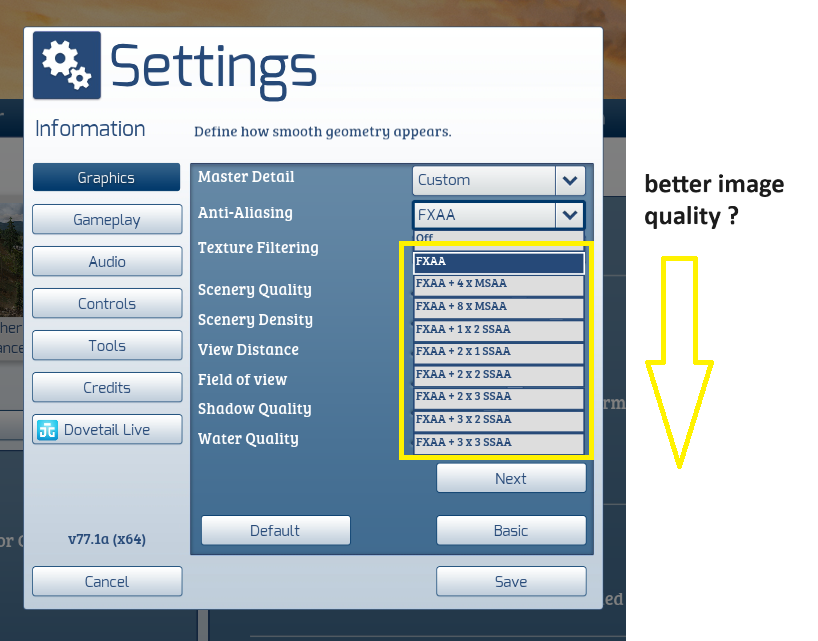
And is the setting from lowest image quality to best image quality ?
Image

This only affects the edges of a curved object. All curved edges are made up of tiny squares anti-aliasing tends to artificially "smooth" these edges into what appears to be a smooth curve or a round object ( e.g hand rails, telephone wires). The higher the anti-aliasing setting the smoother these curved edges appear, the cost is that more processing power is needed. Depending on your GPU this can cost a significant cost in fps. Again it is a balancing act video quality vs performance. Each system configuration is different and you can make changes and see what happens.
Just an old Alaska guy trying to live in an insane world. Degree in life, Masters in common sense.
User avatar
AmericanSteam
 
Posts: 2882
Joined: Mon Nov 02, 2015 9:54 am
Location: Nikiski, Alaska

Re: Game Graphics Settings

Unread postby AmericanSteam » Fri May 03, 2024 2:35 pm

Cardinal51 wrote:
..... The higher these settings are the more processing resources it takes but the better it looks. ....


GPU power, correct ?

How would one typically notice the setting is too high ?

And is the setting from lowest image quality to best image quality ?

Image

AA only affects the edges of a curved object. All curved edges are made up of tiny squares anti-aliasing tends to artificially "smooth" these edges into what appears to be a smooth curve or a round object ( e.g hand rails, telephone wires, rounded corners). The higher the anti-aliasing setting (moving down the list) the smoother these curved edges appear, the cost is that more processing power is needed. Depending on your GPU this can be a significant cost in fps. Again it is a balancing act video quality vs performance. Each system configuration is different and you can make changes and see what happens.
If you open up NVIDIA control panel to Adjust Image Settings With Preview you can see the difference that AA settings make. Look at the left two images.
Do not try to change too many settings at once. Make a change and see what happens, if you don't like the effects, revert back and try something else.
Just an old Alaska guy trying to live in an insane world. Degree in life, Masters in common sense.
User avatar
AmericanSteam
 
Posts: 2882
Joined: Mon Nov 02, 2015 9:54 am
Location: Nikiski, Alaska

Previous

Return to Geek Speak

Who is online

Users browsing this forum: No registered users and 1 guest

cron