https://store.steampowered.com/app/277752/Train_Simulator_Miami__West_Palm_Beach_Route_AddOn/
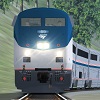
It includes minor corrections to the stainless steel body, the Amtrak Blue stripe and Amtrak Red stripes.
You can download this upgrade here:
http://railworksamerica.com/index.php/download-library/rolling-stock-repaints?view=document&id=3697:miami-amtrak-rolling-stock-texture-upgrade&catid=19:rolling-stock-repaints
You can see it in action here:
https://www.youtube.com/watch?v=hoNSyQVlHf4

Installation:
- 1. Using File Explorer, go to the folder located here:
C:\Program Files (x86)\Steam\steamapps\common\RailWorks\Assets\DTG\Miami
2. Drop the RailVehicles folder from this pack into the folder you just opened.
3. Run Train Simulator to verify that the textures work.
ENJOY!!!