
Another question about 3D Canvas
First unread post • 11 posts
• Page 1 of 1
Another question about 3D Canvas
 by SMMDigital » Thu Sep 09, 2010 6:33 pm
Learning the "new" old version of the software. How do you select multiple parts on 3DC, such as for a joining operation or to move a group? To do this in version 8, you simply CTRL-Left Click on as many objects as you want to select. In version 7, that's not working for me, and i've not been able to figure out another way to do it.
- SMMDigital
Re: Another question about 3D Canvas
by pwillard » Thu Sep 09, 2010 7:29 pm
If you are talking about object MERGE in in version 7... you need to highlight the item you want to merge... select the EDIT TOOLBAR-->MERGE option and then select the item you want to merge it with. You cannot group select multiple items at once and then perform a merge on them all in one step with version 7 or older.
If you are talking about Grouping Objects together under a parent group... by multiple selections and then selecting "GROUP"... you have discovered that this is a new feature in version 8.
You can accomplish the same task in 7 by DRAGGING objects within the HIERARCHY PANEL (one at a time) to make items CHILD objects under a parent group.
You are encountering one of the items that makes version 8 quite different from previous versions.
If you are talking about Grouping Objects together under a parent group... by multiple selections and then selecting "GROUP"... you have discovered that this is a new feature in version 8.
You can accomplish the same task in 7 by DRAGGING objects within the HIERARCHY PANEL (one at a time) to make items CHILD objects under a parent group.
You are encountering one of the items that makes version 8 quite different from previous versions.

-

pwillard - Posts: 70
- Joined: Sun Aug 15, 2010 9:40 pm
If it's not one thing it's another!
by SMMDigital » Sat Sep 11, 2010 4:17 pm
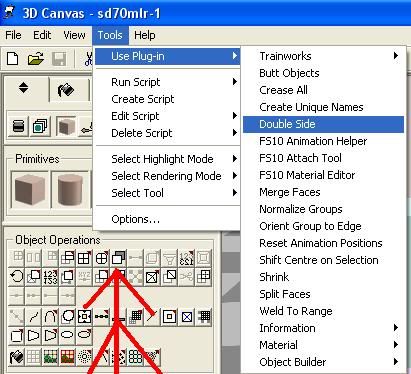
Where is the Double-Side plugin in 3DCanvas 7? I see it in the plug-ins folder, but it's not showing up in the pulldown menu or the object properties box. I know that it is available in 7.1.1, but it has disappeared in the 7.1.2 version.
Good grief this program is going to drive me to drink!
Good grief this program is going to drive me to drink!
- SMMDigital
Re: Another question about 3D Canvas
by SMMDigital » Sat Sep 11, 2010 4:50 pm
Intriguing. You picture shows it, yet it does not show up, nor is there a button for in my 3DC. I have installed the plugins, and I see DoubleSide.dll in the plugin's folder, as well as checked in the Options box. Something REALLY screwy is going on. First, buildings disappearing. Then, no shadows. Now certain plug-ins are not showing up.
Is anyone else running this on 64 - bit Windows 7?
Is anyone else running this on 64 - bit Windows 7?
- SMMDigital
Re: Another question about 3D Canvas
by Trainguy76 » Sat Sep 11, 2010 4:59 pm
-

Trainguy76 - Posts: 630
- Joined: Mon Feb 15, 2010 12:46 am
- Location: San Bernardino, California
Re: Another question about 3D Canvas
by SMMDigital » Sat Sep 11, 2010 5:05 pm
Yes, from Decapods site. I'm thinking that maybe Windows 7 being protective of the Program Files(x86) folder may be keeping the plug-ins from installing correctly. I'm going to uninstall the program and plugins and install them to a folder under my user account and see if that works any better. Used to have to do that with MSTS in Vista.
- SMMDigital
Re: Another question about 3D Canvas
by Trainguy76 » Sat Sep 11, 2010 7:08 pm
Out of curiosity, you made sure all the plug-ins were enabled in the settings right?
-
Trainguy76 - Posts: 630
- Joined: Mon Feb 15, 2010 12:46 am
- Location: San Bernardino, California
Re: Another question about 3D Canvas
by arizonachris » Sun Sep 12, 2010 3:17 am
SMM, is UAC enabled? And have you tried running 3d Canvas as Administrator? Most folks advise against it, but the first thing I did after installing Win 7 was to turn off UAC. Just too dern annoying.
Ryzen 7 2700K, Asus Prime X570P, 32Gb DDR4, 2x 1Tb M.2 SSD's, RTX2060 6Gb, Occulus Rift
Win 10 Pro 64bit, keyboard/ mouse/ wheel/ pedals/ baseball bat
Win 10 Pro 64bit, keyboard/ mouse/ wheel/ pedals/ baseball bat
Security Coordinator on the Battleship Iowa
-

arizonachris - Posts: 3955
- Joined: Sun Mar 21, 2010 10:36 am
- Location: Southern California
Re: Another question about 3D Canvas
by SMMDigital » Sun Sep 12, 2010 1:47 pm
AC, I turned UAC off shortly after installing Win7. It was a major PIA in Vista, so i've got absolutely no use for it. It's supposed to make the computer environment more secure, but i'd rather take my chances than deal with the hassle.
I finally got the double-side plugin, and about five others that I didn't even know I was missing. I uninstalled 3DC from the Programs(x86) folder and reinstalled it to my User/Me/Programs/3D Canvas 7 folder that I created in my account. Again, this is another MS development that is a PIA - not allowing programs to write data to the Program Files folder. For the regular computer user who just deals with spreadsheets and a picture or two of Fluffy, this is not a big deal. But to someone like me who likes to tinker with the system, i've had to find other ways to even install some of my older programs on the computer.
I finally got the double-side plugin, and about five others that I didn't even know I was missing. I uninstalled 3DC from the Programs(x86) folder and reinstalled it to my User/Me/Programs/3D Canvas 7 folder that I created in my account. Again, this is another MS development that is a PIA - not allowing programs to write data to the Program Files folder. For the regular computer user who just deals with spreadsheets and a picture or two of Fluffy, this is not a big deal. But to someone like me who likes to tinker with the system, i've had to find other ways to even install some of my older programs on the computer.
- SMMDigital
Re: Another question about 3D Canvas
by pwillard » Mon Sep 13, 2010 7:06 am
but i'd rather take my chances than deal with the hassle
AMEN.
I'm at the point where I would like proof that these measures actually make a difference to improve the Operating System. Does the not so savvy user blindly say "yes" to the "allow my system to be abused" question anyway?
Anyway, glad you figured it out since I have never seen a problem with Add-ons unless I was beta testing them. My wallet is not Windows 7 Ready so I still use XP... and I'm quite happy that way.
-
pwillard - Posts: 70
- Joined: Sun Aug 15, 2010 9:40 pm
11 posts
• Page 1 of 1
Who is online
Users browsing this forum: No registered users and 1 guest